

Online Interview Questions And Tips For 2025-26
Nowadays, many companies are conducting online interviews over Skype, Google Hangouts, and other video chat platforms. It is because online interviews can drastically save the employer’s money and other resources.
These interviews are really efficient for both the employee and the employer. In this article, we have shared the online interview questions that an employer may ask in any online interview or an in-person interview. In addition, we have also covered some tips for the preparation of online interviews. Most of the companies have started taking online job interviews after the CoronaVirus. So, you can prepare and appear for the interview from the comfort of your home.

Online Interview Questions
Let’s first start with the questions because if you are ready, then it will ensure that your online interview goes well. The key to getting success in any interview is confidence and being comfortable. This is why preparation and practice play an important role to boost your confidence. So, prepare for an online video interview with the following interview questions:
What You Will Learn
1) Describe yourself in short.
This is a basic question that creates your first impression. This question is enough to judge most of your skills. This can set a platform for further questions. To answer this question, be concise and focus on your basic details. Cover important things in short and target your answer to the specific job opportunity.
2) Why do you think that this job is right for you?
This is where your research will be beneficial. You should do research about the corresponding company before appearing in an interview. You should have all the important information about the job and the company. Focus on your skills and experience and tell how you can be beneficial for the company’s growth. Market yourself with unique qualities, something that will differentiate you from others.
3) Mention your biggest achievement of life.
A human’s life is full of achievements. Do some research and find your work-related achievements to discuss. You can also mention your work experience considering it as a personal goal.
4) How do you motivate yourself?
Self-motivation is a critical factor in every job. Employers always expect to find a candidate who can motivate himself and other team members in any tough situation. So, shortlist your skills and achievements and tell them with confidence and energy. Show your employer what helps you to believe in yourself.
5) Why do you want to leave your current job?
This is one of the most important questions and can be a danger if you do not answer this question carefully. To answer this question, do not ever try to say anything negative about the company or manager. Better target your goals and focus on the future. Show the employer that you are looking for a job that can match with your goals and position, highlighting the position for which you are giving an interview.
6) Have you applied anywhere else for a job?
Interviewers may ask this question to measure your interest in their job opportunities. Or they may check if the other jobs you have applied for really match with your goals and position to cross-check your previous answers.
7) You want to ask anything?
It is always critical to have questions ready to ask an interviewer. Better prepare your questions before appearing in an interview. Avoid asking such types of questions that you can easily search through the internet or job posting.
Online Interview Tips
• Choose a private, secluded, and well-lit place with no interruptions. Put your phone in silent mode.• Check your computer hardware to make sure that audio, video, mic, etc. are working properly.
• Dress professionally and avoid bright colors.
• Put a notepad, pen, and copy of your resume on your desk. Also, keep a glass or bottle of water near you.
• Listen carefully, don’t interrupt the interviewer. Also, nod and smile while listening.
• Write a thank you note after the interview and take follow up on progress.
Wrap Up
Online interviewing is a normal part of the hiring process. If you have one to come, it is better to follow all the instructions shared by us in this article.
Please share this...


Tips for Online Interview: In-depth Guide
In this article, we have covered detailed tips for online interview and what to do before and after an online video interview.
We have divided this part into three different sections. Each of them is important. So, I'll suggest you go through each section one by one:
What You Will Learn

Before Interview
Use Best Hardware
If you are using multiple devices then select the one which is the fastest and latest. For most, a laptop will be the best option. If you don't have so many devices, invest in purchasing or borrowing one.
Check Setup
Test your hardware setup and learn how it works. While preparing for an online interview, you need to be sure to test the following components of your hardware setup, system, or device:
• Audio Settings- There are two components to test- a microphone and speakers. Make sure the other person (Receiver) can properly hear your voice while chatting over the video call. Also, check the coming sound through speakers. The sound should be loud and clear so that you can properly understand what your interviews are saying.
• Camera Settings- Adjust your camera settings so that it won't mess up with the clarity of your picture. It should not be too dark or too bright. It is better to remove distracting elements from the background. It is recommended to sit in front of a window having day-light and a solid-colored wall in the background (back-side). This will make the interviewer's focus on you and not the distracting elements behind you.
• Internet Settings- This thing is often ignored. But, it is one of the most important components for doing a video chat. It is best to plugin with an Ethernet connection for a stable connection. Video chatting or conferencing usually takes a lot of bandwidth, so, choose a better internet plan according to that and test it properly.
Choose Right Area
You must choose the right area for your interview. The ideal place for an interview is a quiet room where you will not be disturbed or distracted by people, pets, etc. Lighting is also important, so make sure you have enough light inside a room. Avoid being near windows against busy streets, and make sure children or pets are being supervised if any.
Practice with Mock Interview
The best practice is to plan a mock interview with a friend or family member at the same time that you are going to do the interview. If possible, record the interview from both sides so that you can check it back for yourself. Also, ask your friend, or a family member for honest feedback, so that you know if you are seen and heard adequately, how you look on camera, how the lighting is, and whether you are a professional, Enthusiastic and interested.
Keep Backup Plan Ready
With technology, there is always a possibility that there might be an unexpected error. Therefore, keep your backup plan ready in case something goes wrong during the interview. Here are some suggestions and tips to follow if things go wrong:
• If your audio or video stops working- Before the interview, ask the interviewer for a contact number where you can reach them in case of connectivity issues. If you face technical difficulties, such as a video cut out or sound drop, etc., call that number and ask the interviewer if the interview can be continued on a phone call or rescheduled.
• If someone enters the room unexpectedly- If a family member, a friend, or a pet suddenly enters the room during the interview, apologize to the interviewer. Also, ask your interviewer for a moment to deal with the interruption. Mute your microphone, and step away to fix the issue. Make sure you close the door or secure your place from any other interruption before starting the interview again.
• If noise interrupts the conversation- If your interview is interrupted by noise such as sirens, construction, frequent sounds from the pet, etc., apologize for the interruption. Ask your interviewer for a few moments until the noise subsides. If the noise is severe, it is better to mute the mic.
Research
In addition to location setup and device setup, you should research company details. Prepare the most frequently asked interview questions, set out some specific questions you want to ask, and choose the best outfit that makes a professional impression on the interviewer.
Day of the Interview
Test Again
Re-test all equipment at least one hour before the interview time, so that you are sure that everything is working as planned. And then do another run-through about 30 minutes before your interview.
Dress Professionally
Dress for an online interview in the same way that you come for an in-person interview. Even if you are sitting down, you should also wear pants or a skirt and shoes. Because you will never know about the situations when you have to stand up. Be simple, avoid bright colors and ornaments, etc., which is remarkable. By following this, you make sure that your interviewer focuses on you and not your distracting outfit.
Manage Distraction
Close all other applications or browser’s tabs that might interrupt the interview. Put your phone on silent mode. Tell your family members not to disturb you for that specific time. Ensure that children and pets are being supervised during the interview.
Look into Eyes
Sit up straight and maintain good eye contact as these are important in an interview; either this is an in-person interview or an online video interview. Avoid looking at the screen while replying. Instead, look at the webcam as often as possible when you are replying. This will help you maintain good eye contact; your eyes are likely to align with the interviewer's eye on the other side. While you're listening, you can look back at the computer screen.
Speak Slowly and Clearly
Speak clearly in a conversational voice, just like you would in an in-person interview. Before you start answering, take a few seconds so that you don't end up talking over the interviewer in case of weak signals. Eliminate "ums" and "uhs" while answering, and avoid grammatical mistakes. Keep your answers short and up to the point. The interviewer can always ask for more information.
Listen Carefully
Listen carefully and thoroughly before answering. If you can't hear anything, ask your interviewer to repeat the question, rather than answer it incorrectly. Nod and smile while you are listening, it will make a good impression because the interviewer will notice that you are engaged and focused.
Body Language
Body language is very important during an interview because it can reveal most things about who you are as a person. To present a positive image, sit upright in a chair, place your feet on the ground, and place your hands on your lap or the desk. Eliminate doing things like slouching or holding your head up with your hand because they are much more noticeable during the online interviews.
Avoid Notes
Unlike other interviews, you can have some notes in front of you (off-camera) during an online interview. But it is advisable not to rely on notes because you do not want to look down again and again. This will distract your concentration and leave a negative impact on the other side as well.
After Interview
Write a Thank-you Note
Just as with an in-person interview, you should conclude by thanking the interviewer for the valuable time. You can send a thank you email later that day. This will help you build a stronger relationship with the interviewer and will also help you progress to the next stage.
Follow-up on Progress
To express your interest in the job, you should occasionally follow your interview. Send a follow-up email and get in touch with the interviewer.
Note: If you have already got a date for the result, do not reach out before that date. Wait for the appropriate time period to pass and only then follow up with the interviewer.
Summary
If you are uncomfortable with an online interview or how you look/sound on camera, you can practice it. The more you practice, the more comfortable you will be with the technique. This will help you build your confidence and succeed.
Please share this...
Types of Cybercrime: Definition & Examples
Cybercrime is commonly called a computer-oriented criminal activity that either uses or targets a network, computer system, or network device. It is constantly evolving with new threats coming up every year. In order to keep you safe from cybercrime, it is necessary to have knowledge about the types of cybercrime.
In this article, we have defined the most common types of cybercrime. This article will help you to know what kind of dangers you should know about protecting yourself in the online medium.

Categories of Cybercrime
Cybercrime can be divided into the following three categories:
Crime against Individual
This category of cybercrime usually involves one person that might be distributing malicious software or suspicious information online. Apart from this, crimes against individuals might include identity theft, cyber harassment, staling, spoofing, distribution of child pornography, credit card fraud, etc.
Crime against Property
This category of cybercrime includes crimes that occur against property, such as a computer or a network. Cybercriminals might steal a person's bank or credit card details, gain access to funds, make online purchases, or perform phishing attacks to retrieve a person's information, etc. These crimes usually include hacking, DDoS attacks, cyber and typosquatting, virus distribution, copyright infringement, etc.
Crime against Government
This category of cybercrime includes crimes that occur against the government. These crimes are the most serious offense. It is also referred to as Cyber Terrorism. Typically, these crimes are committed by the terrorists or by the governments of enemy nations. These crimes include accessing confidential information, hacking, cyber warfare, pirated software, etc.
Types of Cybercrime
There are various types of cybercrime, but all such types of cybercrime fall into the following three situations:
• Crime in which the computer acts as a weapon
• Crime in which computer is an accessory to a crime
• Crime in which the computing device is the target
These are the situations that form the type of cybercrime. These crimes distinguish cybercrimes from traditional crimes.
Let’s discuss the most common types of cybercrime:
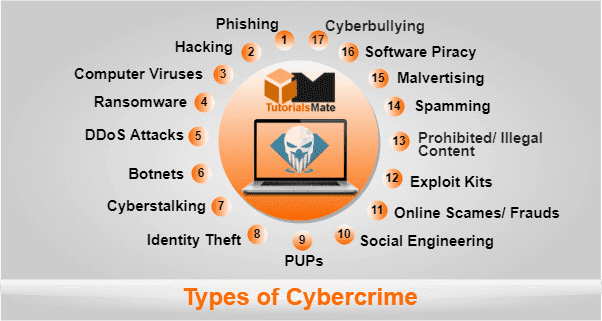
Phishing
A phishing attack involves attackers sending several spam mails having malicious attachments or links. Once a receiver clicks on a link, he/she may be redirected to a malicious site asking the receiver to respond with confidential details, such as login credentials, billing information, etc. This type of attack may also take place through text messages, websites, or even social media platforms.
Hacking
Hacking is a type of cybercrime act where an intruder gets access to a few or complete functions within a system without your permission. Hackers (people who perform hacking) are tending to be computer programmers and they have an advanced understanding of computers. However, they misuse this knowledge for performing illegal activities, such as accessing corporate and government accounts, and stealing their financial data or other important information.
Computer Viruses
A computer virus is one of the most destructive types of attacks where cybercriminals gain unauthorized access to the system and steal personal information and other important data. Mostly, computer viruses are attached to infected software that spreads across other installed software. Viruses can come to your system through removable devices and the internet. Without proper scanning and removing them from your system, the next time you start your system, the viruses will run all over again.
Ransomware
Ransomware is one of the most popular types of malware-based attacks. It enters through a computer network on a local machine and encrypts files using public-key encryption. That means you cannot access encrypted files and the information stored in them. The cybercriminal will then ask for ransom (money) to unlock the files and give your data back.
DDoS Attacks
The DDoS (Distributed Denial of Service) attack is a blatant attempt by cybercriminals to take down a system or network temporarily or completely. This overwhelms a system with multiple connections requests that it cannot handle. Additionally, there may be spam traffic coming from various sources. This eventually leads to server overload. DDoS attacks are used as a distraction technique to allow cybercriminals to hack into the system meanwhile.
Botnets
Botnets are networks from comprised computers that are controlled externally by remote attackers, known as ‘Bot Herders'. The attackers target other computers and send spams or malware by using these botnets. This type of cybercrime is usually performed against businesses and governments because botnets mainly target the entire IT infrastructure.
Cyberstalking
This type of cybercrime involves a person being followed by the cybercriminal online. The stalker will follow the target person virtually, including all the activities. Then, the stalker might harass the victim by using social media platforms, mails, or websites, etc. Cyberstalkers first try to know their victims as much as possible and then make them feel afraid or concerned regarding their safety. In most cases, this type of cybercrime is committed against women and children by individual men and pedophiles.
Identity Theft
Identity theft is a specific type of cybercrime in which attackers gain access to the victim's personal information, including passwords, financial accounts, credit cards, and other confidential information. In most cases, cybercriminals use these details to steal money from your accounts, without your knowledge. Additionally, cybercriminals may use your details to commit a crime or claim government benefits, making others think it was you.
PUPs
PUPs is an acronym for 'Potentially Unwanted Programs'. These are not considered much threatening as compared to other types of cybercrime. These are nothing but a type of malware program that uninstalls important software from your computer system automatically. In addition, PUPs can also remove or change your default search engines within the browsers. They can involve adware and spyware; therefore, it’s a good practice to make use of an antivirus program to prevent any malicious download.
Social Engineering
This type of cybercrime involves criminals making direct contact with the victim through phone, emails, or even in person. Cybercriminals first try to earn trust and then they steal confidential information like passwords, financial accounts data, etc. In most cases, cybercriminals act like a customer service agent of any legitimate company and ask for the important information. Once they get the desired information, they might sell your information or try to steal money from your accounts.
Online Scams/Frauds
These are crimes that involve spam advertisements or emails offering large rewards or high amounts of money. These offers are presented in such a way that they look very real. Once users click on these malicious advertisements or links, the malware reaches their system and compromises the information.
Exploit Kits
Exploit kits are readymade tools designed by advanced programmers. These tools include vulnerability (bug in codes of the program) that helps gain access to a victim's computer once deployed. Cybercriminals can purchase exploit kits online and use them against different users. The exploit kits receive frequent upgrades just like the other software. These kits are usually purchased via dark web hacking forums.
Prohibited/Illegal Content
This is a specific type of cybercrime that includes the sharing of offensive and inappropriate content over virtual platforms. Cybercriminals distribute offensive materials to make people feel hatred against other people, religions, or countries, etc. Offensive content can include but is not limited to, videos of criminal activities, sexual activities between adults, videos with intense violence, etc. Additionally, it can also contain illegal contents like terrorism supported materials or child exploitation materials.
Spamming
This cybercrime involves criminals using electronic messaging systems to send messages to users. These messages usually consist of malware, fake links of websites, and other malicious software. Email spamming is one of the common spamming methods in which bulk messages are sent to large numbers of users. These messages include deals, and promos from trusted companies to attract users to click on the attachments or the fake links.
Malvertising
Malvertising involves criminals filling websites with several advertisements containing malicious codes or links. Once users click on these advertisements, they will be redirected to fake websites that look like trusted ones. Users will submit the personal details, thinking they are legitimate. This information will further reach to the attackers. Furthermore, the websites can automatically start downloading files containing viruses and other malware.
Software Piracy
There are many websites that reproduce original content such as songs, movies, books, games, and other software. It falls under the Cybercrime Act as it translates to copyright infringement. Software piracy greatly affects companies and developers as duplicate products lead to huge reductions in their total income.
Cyberbullying
Cyberbullying is one of the biggest crimes occurring in the virtual world. It is a form of bullying on the Internet. However, global leaders are aware of this crime and pass laws and enactments that prevent the spread of cyber-attack.
How to Fight Cybercrime
At present, almost all the devices (such as smartphones, tablets, and computers) are connected to the internet. Cybercriminals may use a device to gain access to personal information, business information, confidential government information, etc. Therefore, it is necessary to have knowledge about preventive measures that can be taken to fight against cybercrime.

The following are some tips that will help you protect your computer and your personal data:
• Make use of Anti-virus software and keep it updated.
• Keep the operating system and other installed software updated.
• Do not install software from untrusted sources.
• Be cautious while browsing the website.
• Make sure that websites are safe and genuine before you enter any credentials.
• Always use strong passwords with 14+ characters, including upper case, lower case, and numbers.
• Flag and report suspicious emails and do not open any attachments.
• Do not click on any unfamiliar links or ads.
• Do not share suspicious information via digital means unless you are completely sure that it is safe.
• Use a VPN service whenever possible.
• Keep on tracking your bank statements and other financial accounts.
Summary
There can be various ways and types of cybercrime that attackers can use. The only way to protect yourself is to educate yourself about various types of cybercrime and how you can prevent them. Once you are a victim of cybercrime, there is no easy way to get rid of it.
Please share this...
What is Cybercrime: Definition & Examples
Internet usage has increased drastically in the last few years, and therefore Internet criminal activities are developing. Most people think that cybercrime is just a criminal activity in which hackers steal the user's financial information. But that is not the only thing. Cybercrime is constantly evolving with new threats coming up every year.
In this article, we will understand what is cybercrime, the definition of cybercrime, the impact of cybercrime, how it works, etc. Let's discuss this:

What You Will Learn
Introduction to Cybercrime
Cybercrime is commonly called a computer-oriented criminal activity that either uses or targets a network, computer system, or network device. Most cybercriminals commit cybercrimes to make money by targeting individuals. However, some professional cybercriminals can threaten an organization by damaging or disabling the entire network.
Apart from this, the cybercriminal can also use computers or networks to transfer viruses, malware, pornographic content, illegal information, etc. These activities are usually done to damage computers and their data, for reasons other than just a profit.
Usually, a primary motive of cybercriminals is to generate profit for them. To do this, cybercriminals may commit a variety of profit-driven criminal activities, such as stealing and reselling identities, getting access to financial accounts, misusing credit card to get money or goods, performing email frauds, trafficking in pornography or intellectual property, accessing government data for theft and resale, etc. To be specific, cybercrime can range from security breaches to identity theft.
Cybercrime Definition
Cybercrime is a type of crime that involves a computer and a network to carry out illegal activities through digital means. This can be done by individuals or small groups of people with little technical knowledge, or by highly organized global criminal groups with relatively skilled developers and professionals.
Skilled cybercriminals use advanced tools and techniques to hide their identity and location. Additionally, some cybercriminal conducts cybercrime from countries where there are weak or no cybercrime laws. This helps in reducing the chances of detection and prosecution of cybercriminals.
Defining Cybercrime
The Department of Justice (DOJ) in the U.S. has divided cybercrime into the following three categories:
• Crimes in which the computer acts as a weapon, i.e., performing DoS (denial-of-service) attack, etc.
• Crimes in which computer is an accessory to a crime, i.e., storing illegally obtained data into the computer.
• Crimes in which the computing device is the target, i.e., to get access to a computer or network.
These are the crimes that distinguish cybercrimes from traditional crimes. It only states that cybercrime is an attack on information about individuals, enterprises, or governments. These attacks occur on virtual bodies of individuals or enterprises (it is nothing but a set of informational attributes on the Internet).
In addition, the US has signed the European Convention of Cybercrime. Accordingly, anything including the following is considered cybercrime:
• Selling illegal items online.
• Illegal gambling.
• Infringing copyright.
• Illegally intercepting or stealing data.
• Soliciting, producing, or processing child pornography.
• Interfering with systems in a way that compromises a network.
Impact of Cybercrime
It is difficult to accurately assess the actual impact of cybercrime. The impact of cybercrime can be devastating due to the high risk of data loss and financial impact. The effects of cybercrime can be classified into the following three categories:
For Individuals
The impact of cybercrime can be mostly seen on individuals. There can be issues like data breaches, identity theft, or trafficking to malicious sites, etc. with the devices. Due to this, one may see suspicious charges on credit cards and loose access to their financial accounts. Additionally, cybercriminals may misuse data stored on devices for harassment and blackmailing.
For Businesses
Businesses may suffer from sensitive data loss, financial loss, or brand damage, etc. It can directly affect the value of a company, the share price, and can also cause loss of reputation, customers, etc.
If companies fail to protect customer data, they will also have to pay fines and penalties. In addition, a cybercriminal may secretly sell the company's sensitive data to other companies.
For Government
This is a very important offense when accessing government data for misuse. Cybercriminals use advanced tools and technologies to gain access to the government's highly sensitive data. The main purpose of targeting government data is to damage data or sell national security and defense data.
Cybercrime Example
The most common examples of Cybercrime include the followings:

DDoS Attack
One of the most commonly seen examples of cybercrime is a distributed DoS attack. These attacks are mainly performed to shut down systems or networks.
Malware
Malware is used to infect systems or networks and harm users by damaging their software, data, or entire systems. Malware is often used to encrypt or shut down the targeted devices until a ransom is paid.
Phishing
Cybercriminals usually send fraudulent emails or messages to victims and redirect them to fake sites. The site can be an exact copy of any popular site and looks trustworthy. Because of this, users enter their personal information such as usernames, passwords, bank details, or other important data, without knowing that these details are directly reaching cybercriminals.
Credential Attack
A credential attack is the most common example of cybercrime, where a cybercriminal aims to steal information about a user's financial accounts. In most cases, this type of attack is carried out using brute-force by installing the Keylogger software, which secretly logs everything that the user enters via the keyboard.
Website Hijacking
Another common example of cybercrime is website hacking where cybercriminals try to gain access to the website and change or remove content without authorization. In order to perform this type of attack, cybercriminal usually inserts malicious code into a website using the SQL (Structured Query Language) injection method.
How to know if I’m targeted by cybercrime?
It is not easy to find out if a person is targeted by cybercriminals or has been a victim of cybercrime. However, the following signs may be an indication that something is suspicious and may be the cause of cybercrime:
• Malware Infection: Computer or other devices may start running slowly even when there is no heavy applications are running. Additionally, several error messages may occur on the screen.
• Keylogger: There can be various suspicious icons on your machine. Also, there can be duplicate text issue with whatever you type or paste using the machine.
• Botnet: The computer may take a long time to shut down or not shut down properly. In addition, there can be several other activities such as programs running slowly, unable to download windows and antivirus updates, fan running so fast even in the ideal state, etc. It is very difficult to detect if your machine is infected with a botnet.
• Phishing or Pharming Attack: You may see an unknown or suspicious deduction on your credit card or other compromised accounts.
• Cryptojacking: You will notice a decrease in performance even performing very basic tasks on the computer. Also, there can be a hike in electric bills due to heavy resource consumption.
Conclusion
If sudden unexpected activities are happening on your computer, tablet, mobile, or any other network device then there may be a reason for cybercriminals activities. Therefore, if your device behaves strangely and sounds suspicious, then advice should be taken from cyber experts. If you have been targeted by cybercrime, it is better to disconnect the device from the network and take some time to report cybercrime using another secure device.
Please share this...
10 Essential Examples of Web Applications
When browsing the Internet for specific research, shopping, communication, etc., we often see a number of websites that appear as a specific application rather than a general website interface. It may be a reason that we are accessing a respective resource through a website application or a web application.
Many businesses and companies are using web applications these days to facilitate communication and the exchange of information. Supported by Google, the web application is designed to deliver a high level of performance in a cost-effective manner regardless of device or network quality. From productivity software to marketing and customer service tools, these applications help us get our work done quickly and efficiently.
In this article, we are discussing some of the most popular examples of web applications that we often come across while browsing the internet for specific needs. However, before we discuss the examples of web applications, let us first take a brief introduction to the definition of a web application.
What is a Web Application?
By the definition, “A web application is defined as a computer program that utilizes the specific web browsers and web technologies to help us accomplish certain tasks over the internet.”
A web application typically uses a web browser as the user interface and runs through a web server that responds to certain requests made by us as a client through the browser. That's why web applications are also called the 'client-server model'. Web applications rely on Internet connectivity and can work through supported browsers on various devices, such as desktop computers, laptops, mobile phones, tablets, etc.
With the advancement in web applications, commonly referred to as progressive web applications (PWAs), some of these applications can work without an internet connection, enabling syncing feature once an internet connection is available. These applications are designed to be responsive so that their appearance automatically adjusts based on the devices.
What are the examples of web applications?
Nowadays, there are many web applications on the internet, and even new ones are coming regularly with unique features. With web applications, as long as the browser is compatible, users have the advantage of using the respective source on different platforms regardless of device or operating system.
There is a wide range of dynamic web applications in different categories, including word processors, spreadsheets, email, file scanning, file conversions, shopping carts, online forms, photo or video editing, and more.
Although there are many web applications of different categories to help us perform certain tasks, listed below are some notable examples of web applications:
.png "Examples of Web Applications")
Google Office Suite
Google Office Suite, also known as Google Workspace and G Suite, is one of the most popular and widely used collections of web applications. Google Docs is one of its word processing web applications that helps users to create documents using a web browser, while automatically saving document data on the respective server.
Like Google Docs, G Suite's other popular web applications include Gmail, Drive, Sheets, Slides, Forms, and more. Some of these web applications (Gmail, Docs, etc.) also work without internet connectivity available at all times. They allow users to work in offline mode and sync data with servers as soon as they are connected to the internet.
Google is always striving to bring its products to the web, making them accessible to everyone through a browser. However, all Google products are also available as mobile applications and typical native websites.
Microsoft Office 365
Initially, Microsoft developed its Office suite as a set of software, such as Word, Excel, PowerPoint, etc., that needed to be installed on the Windows platform. However, after the launch of the Google Office suite, Microsoft also released its Office suite as a web app to compete in the market. Like the Google Office suite, the software included in Office 365 works through the browser like other web applications.
Office 365 (also known as Office Web Apps and Microsoft Office for the Web) is an online office suite that allows users to create and edit Office documents or files through a modern web browser. This makes it easy for users to work in the cloud while syncing their files or data across multiple devices. With Office 365, a collaboration between people has also become easier, allowing them to work securely on files shared online as a team, remotely.
Along with the Office desktop and web versions, users can also install the Microsoft Office applications on their mobile devices running on major platforms such as iOS and Android.
Amazon
Amazon is one of the most popular and largest online retailers in the world. In the beginning, Amazon was focused on selling books. However, it then expanded to sell many more consumer goods and digital media such as e-books. Nowadays, Amazon is also selling its own electronic devices (e.g., Kindle e-book readers, Fire TV, Alexa, etc.) and many other products.
In 1994, Amazon was initially incorporated by Jeff Bezos under the name Cadabra. However, with its website launch in 1995, its name was changed to Amazon. Amazon also came out with its own comprehensive, evolving cloud computing platform in 2006, called Amazon Web Services (AWS).
AWS aims to provide users with on-demand scalable web and application servers, databases, storage, cache, search, backup, DNS, load balancing, content delivery, and many other web and application services so that users can build and run applications while delivering a great user experience.
With its launch of the web application, Amazon made it even easier for users to access its products directly through a browser, while accessing most of the amazing features in a quick and fast way. Additionally, Amazon has made digital streaming easier and more accessible through the browser. This resulted in an increase in conversions as well.
Canva
Canva is a great example of a web application designed primarily for visual creators. It provides an easy-to-use, quick, user-friendly interface to help users create graphics like images, logos, posters, animations, presentations, videos, etc. It was established in 2012 and gained popularity with its amazing features.
One of the amazing features of Canva is the syncing which helps users access their designs across different devices using their accounts. Additionally, users can share as well as work collaboratively on designs from different locations.
Although Canva is currently not as popular as Adobe Creative Suite, it has made it easier for beginners to create designs. Unlike Adobe products, Canva doesn't require high-end devices and a lot of local space. Being a web application, Canva runs through a web browser using the Internet. With the ever-evolving nature of web technologies, Canva is going to be more powerful and will bring graphics designing to a website as a whole. We can also download and install the Canva mobile application.
Pinterest is one of the world's most popular image sharing and social media service platforms that enables users to search, share and download images, GIFs, PNGs, and videos on their Pinboards. Users will need to create an account on Pinterest or log in using the respective services to access all the amazing features. Many businesses are taking advantage of this platform to promote their products, increase blog traffic and generate new leads.
Initially, Pinterest did not receive a good response and struggled to acquire new users as well as retain existing users. Most users reported that the Pinterest website experience was too slow, resulting in reduced sign-ups and mobile app installs. This led to the development of Pinterest's progressive web application.
Pinterest's progressive web application has enabled faster performance, push notifications, offline mode access, syncing, and many other amazing features. This resulted in greater user engagement on the mobile web and further increases in ad clicks, sign-ups, and time spent by users.
Spotify
Spotify is an audio-streaming platform that is widely used all over the world. The company mainly focuses on providing music streaming; however, it has recently become a leader in podcast production and distribution.
Spotify provides users with amazing features and a professional, easy-to-use user interface. Users can save their favorite songs, create and share song lists, select specific categories for a personalized music experience, and play the same song on multiple devices at once.
To compete in the market, Spotify created a progressive web app version like other platforms. The Spotify PWA version is significantly faster and offers some unique features compared to its native website experience. Its intuitive, user-friendly PWA version prioritizes music discovery, which has helped the product rise through the ranks of music solution providers over the years.
Netflix
Netflix is one of the most popular video-streaming OTT platforms and is available as both a web application and a mobile application. Netflix allows users to watch TV series and movies on demand on a paid subscription basis. Like other web applications, we can access Netflix on various devices through supported browsers regardless of the operating system.
Based on the selected Netflix subscription, users get to watch the content on multiple devices without any limitations. In addition, Netflix allows users to watch personalized content, mark favorites, access different categories, etc.
Netflix demonstrates how web apps can be ideal as a content platform. Netflix currently has the highest number of subscribers as compared to other popular OTT platforms like Amazon Prime, Apple TV+, Disney+Hotstar, VOOT, etc.
WhatsApp is one of the world's most popular cross-platform messaging applications that enables users to send and receive messages from their devices using the Internet. It was initially released in 2009 by two former Yahoo employees, Jen Koum and Brian Acton. In 2014, WhatsApp was bought by Facebook.
WhatsApp was initially launched only for mobile devices. However, it was later released for all major platforms due to its increasing popularity. In 2015, the company also introduced WhatsApp Web, a program that enables users to access their messages using modern browsers. The WhatsApp web application was nothing but an extension of the user's phone. That means it was not meant to operate independently. Instead, it typically mirrored messages and conversations from the user's mobile devices while keeping all the data on the mobile devices.
To use WhatsApp Web, users need to log in through the browser by scanning the personal QR code generated by WhatsApp's own mobile application. Also, both the mobile application and the web version of WhatsApp need to be connected to the Internet to continue their functions.
Zoom
Zoom is a cloud-based audio/video communication program or software that enables users to conduct virtual conferencing or meetings, live chat, create events or webinars, and perform many other collaborative tasks.
Zoom was founded in 2011 by Eric Yuan, a former Cisco engineer, and executive. However, Zoom gained a lot of popularity during the COVID-19 pandemic. It helped people to work, communicate or get education remotely from the comfort of their homes. It has both free and subscription-based plans with some limited features.
The Zoom web application enables users to join meetings or webinars using their web browser without downloading any software or plugins. However, the web client version of Zoom does not provide all the features and not all browsers are supported. Zoom web application was intended to help users who are limited in downloading due to their internet speed or device capacity.
Uber
Uber is one of the popular ride-sharing platforms that enables users to book rides from one place to another by paying relevant charges. Users get various online and offline payment options. Also, it allows users to book a ride for themselves or their relatives by availing the internet from the comfort of their homes.
Uber was incorporated in 2009 and soon became popular in many countries. The service is available in thousands of cities around the world, allowing users to request rides when needed. The company usually hires independent contractors as drivers to continue its services. This means that people can also join Uber as a driver to earn a good amount of money.
With its growing popularity, Uber came up with two different web applications, one for drivers and the other for riders. Both the web applications have different interfaces and can be accessed after logging in using the respective driver/rider account credentials. In this way, Uber significantly provided an app-like experience to users on their devices through modern browsers, regardless of users' mobile capability, location, and network speed.
Summary
This article discusses about 10 examples of web applications that are most popular and widely used to fulfill certain requirements. These web applications include many of the same functionalities and design elements as their respective websites or mobile applications. However, web applications have several advantages or benefits as compared to their typical websites or mobile applications.


Please share this...