Difference between Webpage and Website

Webpage and website are two common terms in internet browsing and web. Both of these are linked to the SERP (Search Engine Results Page) and allow users to find relevant information. Although both the terms are used interchangeably, there are significant differences between the webpages and websites.


Difference between Webpage and Website

This article differentiates webpage and website, to help us understand when we navigate a webpage and when a website. Before we compare webpage and website, let us first understand both with their brief definitions:


What is a Webpage?

As the name suggests, a webpage is a solitary page or a document of any website on the Internet. Each webpage is associated with a unique address, called a URL. The URL can be accessed and rendered through web-browsers (such as Google Chrome, Firefox, Microsoft Edge, etc.) without the need for any source navigation.


Web browsers help to display webpage content by connecting to an appropriate server of remote files. Although webpages do not require a navigational structure to be accessible, most developers link them to a website to create a structured user interface and rigid sitemap. It mainly helps in Search Engine Optimization (SEO).


Webpages are created using programming languages, such as HTML, CSS, JavaScript, etc. HTML webpages have a simpler interface and are mainly used to establish the basic structure, while CSS helps to make webpages interactive with colors and designs. JavaScript, on the other hand, helps to make webpages dynamic with rules or validation.


Depending on the requirements and the preferences of the developer, the webpage may contain text, graphics, audio, video, and hyperlinks to other webpages. Besides, there are two different types of webpages, namely static webpages and dynamic webpages.


Characteristics of Webpage

The following are the main characteristics of the Webpage:


Multiple webpages may contain similar titles and contents; however, they must have different URLs.

Webpages are always associated or hosted under a specific domain address or website address.

Webpages are easy to create and take less time.

What is a Website?

A website generally refers to a central location under a unique domain that groups multiple webpages with unique hyperlinks. Websites mainly consist of general and contextual sections, which further link to other related webpages. Websites are also created using web-based programming languages similar to webpages. But, building a good website requires more time and knowledge.


Websites can be accessed through web-browsers. Web browsers request to get the required files or documents which help in building the website. Such files or documents are hosted on computers, which are named servers. The server responds to requests made by web-browsers and sends the desired data to the browser to render the website.


Websites can be of two types: static and interactive. Static websites only provide information or resources without involving or interacting with users. In contrast, interactive websites provide information and allow users to interact using chatboxes, comment boxes, article submissions, etc.


There are different categories of websites, such as social networking websites, dating websites, affiliate websites, e-commerce websites, non-profit and government websites, etc. A typical website includes hyperlinks to pages, such as the homepage, about us, contact us, services, products, and more.


Note: Generally, websites have multiple webpages such as homepage, about, contact, privacy policy, blog, forum, etc. However, it is not mandatory. Websites can also be created as single entity content with no hyperlinks to other webpages. Such websites are called ‘single page websites’.


Characteristics of Website

The following are the main characteristics of the Website:


A website is a collection of webpages with texts, media, and other content.

Each website has its unique domain address and all the respective webpages are created under a corresponding domain.

Websites are complex to develop and take more time.

Webpage Vs Website: Key Differences

Let us list down some of the major differences between webpage and website:


A webpage is defined as a small component of a website that contains various resources and links to other webpages. In contrast, a website is defined as a platform that contains relevant webpages addressed to specific URLs.

A webpage is a single record or a document on the web. In contrast, a website is a collection of documents linked under a unique domain.

A webpage address depends on the website address and is associated with the specific domain name or address. But, a website does not depend on any of its webpages and can run independently even if some pages are removed.


A webpage address usually ends with an extension, such as .html, .htm, .aspx, .php, etc. On the other hand, there is no file extension at the end of the website address.

Webpages typically contain single entity content, whereas websites contain content from different entities.

Webpage designing, development, and maintenance are relatively easy and takes less time. On the other hand, a website is complex to design, develop and maintain, hence it takes more time as compared to webpage.

Note: Webpage is also known as 'page' and 'web page'. Likewise, a Website is also known as 'site' and 'web site'. Both (the webpage and the website) can be public or private, depending on how the developer or admin has configured the preferences.


Difference between Webpage and Website

Difference Between Webpage and Website

Let’s discuss the differences between Webpage and Website side by side with the help of the following comparison chart (in a tabular form):


Webpage Website
A webpage refers to a small part of a website and may contain various contents, such as text, media, and hyperlinks to other webpages. A website refers to a collection of multiple webpages linked together under a unique solitary domain. It may or may not contain other resources depending on the requirements.
A webpage is a single document on the Internet that is linked to a specific URL under the respective domain. A website is a collection of several documents associated with a specific domain.
Webpage is the content that is displayed on the website. A website is a place to put and display content.
A webpage usually contains content related to a single entity type. A website usually contains content related to different entities.
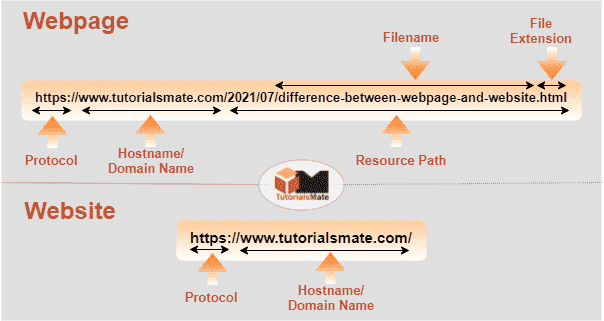
Webpage addresses typically include a protocol, domain name, domain extension, and file or resource path along with the file extension. Website addresses usually include a protocol, domain name, and domain extension without the file/resource path.
A webpage can be accessed normally by navigating through the respective website or by browsing through the URL directly in a web browser. A website can be accessed by navigating through a domain address in web browsers.
The web page address is dependent on the website address and must be associated with the respective website address or domain. The website address is independent of the webpage, which means it does not depend on the address of the webpage.
Webpages cannot function without the website address/domain. Websites can work on their own. Even if some webpages get deleted, the website continues to work with all other linked webpages.
Creating a webpage is not that complicated. Websites are complicated to build.
Since creating a webpage is not complicated, it requires less time and knowledge to develop. Since building a website is complex, it requires comparatively more time and knowledge to develop.
Common examples of webpages are login page, sign up page, about page, contact page, privacy policy, sitemap, etc. Common examples of websites are Amazon.com, Quora.com, Wikipedia.org, Tutorialsmate.com, etc.

What is the main difference between a webpage and a website?

A webpage refers to a single document on the Internet with a unique URL address. Furthermore, a website refers to a cluster of multiple webpages with information on different topics or products linked under a unique domain address. This is the fundamental difference between a webpage and a website.


Understanding Webpage and Website with an Example

To understand a webpage and a website better, let us differentiate them with the help of an example. Let's consider a book with a unique title that has pages with unique page numbers. In this case, a book may be referred to as a website with a unique domain address (i.e., a book title). Furthermore, a book also has many pages with unique numbers, such as 1, 2, 3… etc. Book pages can be referred to as webpages with specific URL addresses (i.e., 1, 2, 3...and so on).


Apart from the above example, we can also distinguish the difference between a web page and web site with a live example.


For example:

https://www.tutorialsmate.com/
Scroll ⇀

This is our domain and it is a website.


Besides, the URL we are currently reading is:


https://www.tutorialsmate.com/2021/07/difference-between-webpage-and-website.html
Scroll ⇀

It is a webpage of the website Tutorialsmate.com.


Specifically, a webpage is nothing but a linked page of a specific website.

Difference between Webpage and Website

Summary

The purpose of both a webpage and a website is to help provide the desired information to users in different categories on the Internet, but there are many differences. A webpage is a smaller part of a website that includes text, media, and hyperlinks to other pages. On the other hand, a website is a group of many webpages of relevant topics addressed to particular URLs.

What others reading:
Read Article

Difference between Email and Gmail

With the increasing use of electronic devices and gadgets, the technological era has demanded easy and secure methods or platforms for communication in digital mediums. When it comes to sending or receiving digital messages over the Internet, Email and Gmail are two of the most popular terms used as a means of communication these days. Although both the terms are used interchangeably, there are significant differences between Email and Gmail.


Difference between Email and Gmail

This article differentiates Email and Gmail, helping us understand the functions or requirements of both. In addition, the article is also helpful in deciding to choose the right communication medium for personal and commercial use. Before we compare Email and Gmail, let us first understand both with their brief definitions:


What is Email?

Email is a short form of ‘Electronic Mail', where the term 'mail' refers to a digital message (or files, or both). The term 'electronic' defines that communication is made using electronic devices. Email is also denoted as ‘E-mail’, ‘e-mail’, and ‘email’.


By definition, “Email is defined as a method that facilitates the exchange of digital messages and files between two or more electronic devices (such as desktops, laptops, notebooks, tablets, smartphones, etc.) via the Internet.


Most electronic devices come with built-in email support, providing a basic text editor for composing new emails. Using the editor, users can either create a new email or copy the content directly into the email composer. However, users must have the recipient's email address to send an email. The email address is unique to each user for a single email account. But, users are free to create more than one email account to have more email addresses for specific purposes.


Email messages typically have two primary components, namely the header and the body. The header contains a summarized log of the sender and recipient along with the subject and date of the message. Besides, the body contains the main text-based message and multimedia content, such as graphics, images, videos, etc.


Advantages of Email

The following are the main advantages of the Email:


The email service is free of cost.

We can send and receive multiple emails using the email service.

Emails help us to send or receive messages much faster than traditional or physical post/mail systems.

Emails can be stored for a very long time, allowing users to keep records digitally. Users can decide to keep or delete emails according to their own using the email client.

Since there is no use of paper, email is considered to be much nature-friendly than the physical postal system. An email has helped in reducing the wastage of natural resources to great extent.

What is Gmail?

Gmail is the short form of 'Google Mail'. It is defined as the most popular and widely used web-based email service launched by Google and helps users to exchange digital messages (send and receive email) over the Internet. The Gmail web-based interface can be accessed on any computing device using the web browser. Additionally, users can also install the Gmail application on different devices or platforms, and sync their emails accordingly.


According to sources, Gmail was primarily designed to facilitate communication for those already working at Google. However, it was later released for public use with many new features and integrations over time. Gmail became popular in a short time because it could store several gigabytes of messages and data for as long as the user wanted.


Gmail currently provides 15 gigabytes of free disk space to each user account. However, users can increase this limit and avail themselves of more services by paying some extra money. It helps companies and businesses to have a centralized solution for managing their emails and documents.


Gmail is currently a fully-featured email service with all the necessary services and products. It uses standard email protocols, namely POP, IMAP, and SMTP. Email protocols mainly help users to fetch or download their emails from servers on different devices and platforms.


Advantages of Gmail

The following are the main advantages of Gmail:


Gmail is considered the most secure email client because it has many security features including virus detection. If there is a malicious link or attachment, Gmail usually blocks it from the execution and notifies the user.

Gmail has a spam filtering feature that automatically detects spam emails and moves them to a folder called Spam. However, users can access the spam folder and check whether they are important or not. Also, messages stored in the Spam folder can be moved to another folder or vice-versa.

In addition to all the email features, Gmail also has a strong personalization feature. It allows users to modify the font style, font size, color, background, theme, and more.

Gmail is freely available for personal use and users can store emails or files up to 15 GB. Also, users can create multiple accounts to have multiple individual Gmail IDs.

A single Gmail ID or address can be used to access all Google services like Google Play, Google Docs, Google Drive, YouTube, etc.

Email Vs Gmail: Key Differences

Let us now list down some of the major differences between Email and Gmail:


Email is an abbreviation for 'Electronic Mail', while Gmail is an abbreviation for 'Google Mail'.

Email is the way of exchanging electronic messages or emails and digital data over the Internet, whereas Gmail is the platform or email service provider that allows users to exchange emails or data.

Email is not as secure as Gmail.

Email does not have any virus detection feature and therefore may be vulnerable. In contrast, Gmail checks for viruses in every email that passes through its servers, ensuring security for users.

The email has no spam filtering feature and notifies for each unnecessary and repetitive email. On the other side, Gmail has smart spam filtering and can be configured to get notifications only for important emails.

Email does not provide scheduling features for mail, whereas Gmail enables users to schedule mail at specific times.

Email receives or downloads incoming messages at specific intervals specified by the user. Besides, Gmail receives each message as soon as it arrives, eliminating waiting times.

Difference between Email and Gmail

Difference Between Email and Gmail

Let’s discuss the differences between Email and Gmail side by side with the help of the following comparison chart (in a tabular form):


Email Gmail
The term Email is an abbreviation used for 'Electronic Mail'. The term Gmail is an abbreviation used for 'Google Mail'.
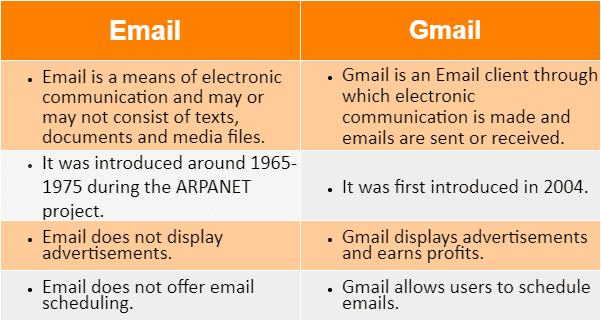
The email was introduced by engineers between 1965 and 1975 (circa 1971) while working on the ARPANET project. Gmail was first introduced in 2004. However, it was initially available to invited users.
Email is referred to as the technology that helps to exchange digital data (text messages or digital/media files) over a communication network such as the Internet. Gmail is referred to as the platform that allows users to send and receive emails. It is a free service offered by Google with limited disk storage.
Email is a means of electronic communication and may or may not consist of texts, documents, and media files. Gmail is an Email client through which electronic communication is established and emails are sent or received.
Email is not considered secure because it has no security and may contain malicious links or attachments. Gmail is more secure than any other email service as it has many security features such as virus protection, email filtering, spam protection, etc.
Email does not work without an Email service provider like Gmail, Yahoo mail, Hotmail, etc. Gmail uses different protocols to allow easy, secure, and systematic management of emails.
The typical structure of an Email ID is username@domain. The typical structure of Gmail ID is username@gmail.com.
Email does not allow users to schedule emails at a specific time. Gmail has an email scheduling option that allows users to schedule emails at the desired time. It helps users to automatically send formatted emails at a specified time.
Email does not allow users to manage or move emails into different folders or categories. Using Gmail, users can create new folders or use the default ones to manage/move specific emails according to them.
Email is not affiliated with advertisers and therefore does not contain any advertisements. Gmail makes a profit by displaying relevant ads to target users to continuously offer free email services to users for personal use.
Email offers features like auto-syncing and manual syncing. Gmail offers features like auto-syncing, manual syncing, scheduled emailing, virus protection, spam filtering, email reminder, etc.
Email enables users to set auto sync time and peak sync time by choosing hour, day, or week. Emails will be fetched/received as per the specified configuration. Gmail automatically syncs emails as they arrive. However, the respective device must have the auto-sync feature turned on.
Email does not support any kind of third-party extension to extend the functionalities. Gmail offers support for a wide range of third-party extensions that can help extend or add more features. For instance, users can track email delivery status, read receipts, etc.
Email offers minimal customization options or formatting styles. Gmail provides amazing formatting or customization features. Users can modify font, color, and email style using tools and HTML/CSS.

What is the primary difference between Email and Gmail?

The fundamental difference between an Email and Gmail is that email is a way of exchanging electronic messages or digital data between electronic devices via the Internet, while Gmail is one of the many email platforms (or client, or service provider) that lets users avail email service and exchange messages with easy GUI support and extended features. It is not easily possible to use an email service without an email client or email service provider.


Summary

The above comparison between Email and Gmail makes it clear that there are several notable differences between them. Although both the terms (Email and Gmail) sound similar and are used interchangeably, they have their own features or characteristics and are used differently. Specifically, email is nothing but a communication method whereas Gmail is a platform through which emails can be sent or received.


What others reading:
Read Article

Difference between Hardware and Software

A computer system (also called a desktop) is usually classified into two sections, namely hardware and software. Both these sections are necessary for the computer system to run properly. Although both the terms seem to be similar, there are significant differences between hardware and software.


Difference between Hardware and Software

Before we compare hardware and software, let us first understand both with their brief definitions:


What is Hardware?

Hardware refers to the physical devices or components that are physically connected to the computer. Hardware devices are tangible and help to set up a computer system. Hardware alone cannot function to serve the purpose. They are connected together to function properly. Input devices, output devices, storage devices, processing devices, and other internal components are examples of hardware in a computer system.


Some hardware devices can be touched and seen directly, while others are assembled inside the computer case (called the CPU in general; however, it’s not). Hardware devices or components are usually classified into internal and external hardware, depending on whether we can directly or indirectly see and touch such devices. For example, RAM is internal hardware while the keyboard is external hardware.


What is Software?

Software refers to a collection of data, instructions, programs, or rules that instruct a computer system or electronic components to work efficiently and accomplish desired outputs. Specifically, the software is developed using various programming codes and executed through a computer's processor.


The software allows hardware devices to communicate and enables users to control inputs and outputs. It helps in the functioning of the hardware in the computer. Also, the software can help users to perform a specific task depending on the type of software. Google Chrome, VLC, Word, Excel are some popular examples of software.


Hardware Vs Software: Key Differences

Let us list down some of the major differences between hardware and software:


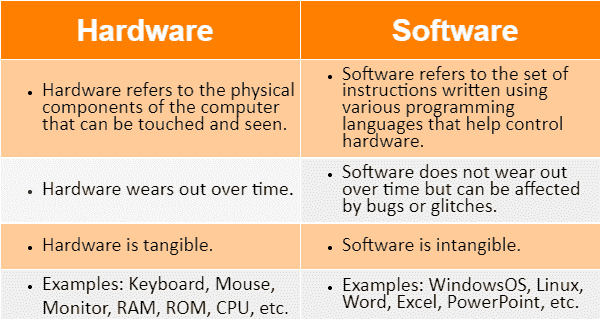
Hardware refers to the physical components of the computer that are used to store and execute/run the software, whereas software refers to a set of instructions given to the computer to control the hardware to perform a certain task.

Hardware is categorized into input, output, storage, and external components. Furthermore, the software is categorized into system software and application software.

Hardware usually wears out over time, whereas software does not. But, the software can face bugs and glitches.

Hardware cannot be transferred electrically from one place to another, whereas software can be transferred electrically with network access.

Hardware is known to understand only machine-level language. In contrast, the software takes input in human-readable languages, and then interprets it in machine-level language and sends it to hardware for further processing.

Examples of hardware are the keyboard, mouse, monitor, speakers, webcam, hard disk, etc. Besides, the examples of software are MS Word, Excel, Photoshop, Windows OS, Linux, etc.

Difference between Hardware and Software

Difference Between Hardware and Software

Let’s discuss the differences between Hardware and Software side by side with the help of the following comparison chart (in a tabular form):


Hardware Software
Hardware refers to the physical components of a computer that help to set up a computer system and execute instructions. Software refers to the set of instructions that help users to interact with computer components and instruct the CPU to do the intended or specified tasks.
Hardware devices are manufactured using electronic components and other materials. Software is written using various programming languages like Java, Python, etc.
Since hardware is of physical nature, we can touch and see the hardware. Software is not physical in nature and cannot be touched. However, it can be viewed digitally on a computer.
Hardware is generally classified as input devices, output devices, storage, and internal components. Software is generally classified as system software and application software.
Because of its physical nature, hardware will wear out over time. Although the software doesn't get damaged physically, it can get affected due to glitches and bugs.
Hardware does not get infected by computer viruses. Software can be infected with computer viruses, malware, Trojan, etc.
If damaged, the hardware can be physically replaced with an entirely new component or part. If infected, the software can be reinstalled using the installer or from a backup.
Hardware devices cannot be moved from one place to another electrically using a network. They must be physically moved. Software can be easily transferred from one computer to another using a network.
Hardware devices help to process operations at the machine level. Software mainly helps to control the hardware and provide results based on the task given to the computer.
Hardware is referred to as tangible. Software is said to be intangible in the traditional sense. However, it may also be referred to as a tangible asset based on certain accounting standards.
Hardware failures are usually caused by overheating, dust, etc. Software failures are usually caused by overloading, systematic error, major-minor version error, etc.
Hardware is dependent on the software and starts working after the software is loaded. Since the software runs on a computer system and controls the hardware components, it cannot function without hardware. Thus, the software is also dependent on hardware in some way or the other.
Examples of hardware include mouse, keyboard, speaker, webcam, scanner, printer, etc. Examples of software include Excel, Word, PowerPoint, VLC, Google Chrome, Microsoft Windows OS, etc.

What is the main difference between hardware and software?

The fundamental difference between hardware and software is that the hardware can be referred to as the physical components of a computer system, while software can be referred to as a set of instructions that instruct a computer system or hardware components to operate and perform specific tasks or functions.


Note: Both hardware and software are dependent on each other and are essential for the proper functioning of the computer system. However, not all the hardware and software are compulsory.


Understanding Hardware and Software with an Example

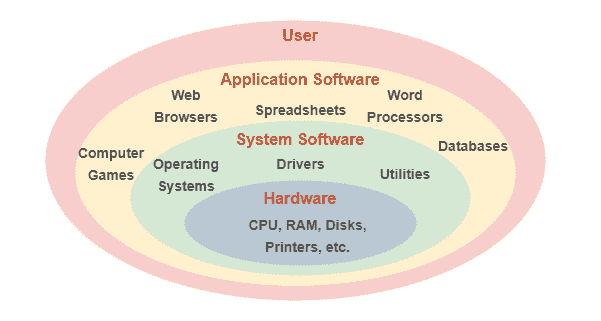
System software, such as an operating system, establishes an interface between computer hardware and the user. The operating system controls all the basic functions like hardware, memory management, process management, file management, input-output device management, etc. Using this interface, users can interact with hardware devices and give instructions to the system. Users can install specific application software to perform specific tasks such as image editing, video processing, opening media files, etc.

Difference between Hardware and Software with Example

There are many examples of both hardware and software. However, we have discussed some of the most common ones below:


Examples of Hardware

A wide range of hardware is used on computers. The following are some of the primary types of computer hardware:


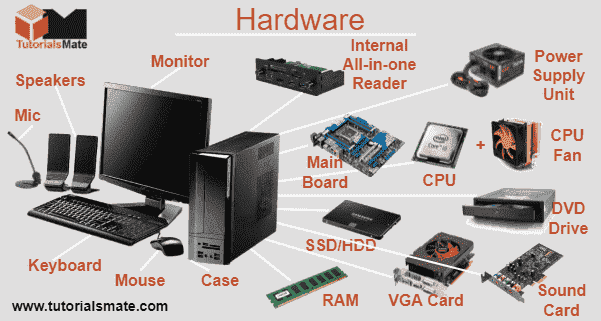
RAM: RAM or Random Access Memory is a form of hardware and works as a computer's primary memory to temporarily store current data (or ongoing data) so that it can be easily and quickly accessed by the processor. It is a volatile memory and the data stored in it is lost when the power supply is disconnected.


ROM: ROM or Read-Only Memory is a non-volatile storage medium that stores essential computer data such as firmware. The data stored in ROM can only be read and is almost impossible to modify by the user. It keeps the stored data even after the power is turned off. It gives read-access to the computer's processor to write/load boot-up data and system files into primary memory.


CPU: The CPU or Central Processing Unit is called the brain of the computer. It is one of the primary components of a computer system and includes the Control Unit (CU) and the Arithmetic Logic Unit (ALU). It processes instructions and handles calculations and other logical operations of the computer. CPU is also known as processor, central processor, microprocessor, and chip.


Motherboard: The motherboard is the main printed circuit board (PCB) in a computer system. It typically boards most of the important computer components, including the CPU, RAM, ROM, connectors, and ports for input, output, and storage devices. It is assembled inside a computer case along with other electronic chip components.


Keyboard & Mouse: These are the primary input devices that enable users to enter data into a computer system. The keyboard consists of several keys that help to input alphabet letters, numbers, signs, and other information. The mouse works like a point-and-click device, which helps in moving the cursor and selecting specific objects on the computer's screen (also called Monitor).


Examples of Hardware: Hardware vs Software

In the image above, some other popular hardware devices or components are displayed.


Examples of Software

A wide range of software is used on computers. The following are the two main types of software in a computer under which all software can be classified:


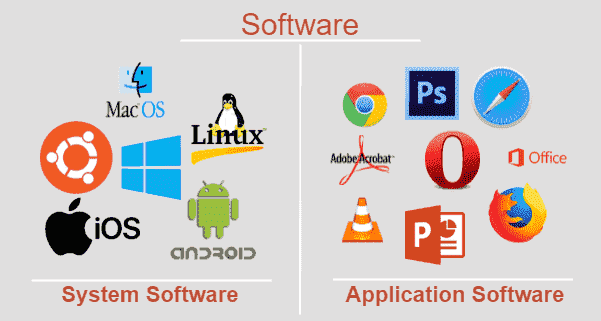
System Software: System software includes the set of core programs and settings that help operate a computer system. System software primarily manages or controls the operation of hardware components. Also, it provides a platform to develop and run application programs. System software is necessary to operate a computer system. For example, operating system, device driver, firmware, language translator, etc.


Application Software: Application software includes a set of codes that help users perform specific tasks using a computer system. It primarily runs in the front-end and requires a platform designed by the system software. However, the application software does not replace the system core functions. It is designed to meet the requirement of users to perform specific tasks like Photoshop, web browsing, media manager, etc.


Examples of Software: Hardware vs Software

In the image above, some popular system software and application software are displayed. There are many more.


Summary

Hardware and software are two important components of computer systems and other electronic devices like mobile phones, tablets, etc. Although essential and interdependent, there are many differences between the two (hardware and software). This article differentiates the hardware from the software.


What others reading:
Read Article

Difference between Input and Output Devices

A computer system is a combination of several hardware devices or components. When all the components are connected and the appropriate software is installed, it combined forms a computer. However, to interact with computer systems, we generally use input and output devices. Both of these have an important role in the functionality of a computer system and there are significant differences between input and output devices.


Difference between Input and Output Devices

Before we compare input and output devices of a computer, let us first understand both with their brief definitions:


What is an Input Device?

An input device is a hardware component connected to a computer that accepts data/instructions by the user and turns it into a pattern of electrical signals in binary code understandable to the computer. An input device cannot receive data from another device. However, it can transmit data to another device. An input device is a user-controlled device with complex coding.

Input Device

The computer can be programmed with some predefined code to operate itself; but, we will not be able to feed the data in real-time. With input devices, users can feed data in real-time to perform more advanced operations.


What is an Output Device?

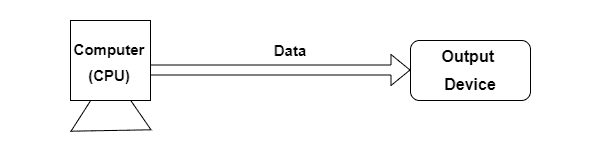
An output device is a hardware component connected to a computer that converts the computer's received digital signal into a form understandable to users. Technically, it provides the result of processing or processed data. An output device is a computer controllable device and is known to receive data from other devices to generate output.

Output Device

The computer can work without an output device; however, we will not be able to display the results to be sure whether the processing of the data is going in the right direction. Output devices are technically the opposite of input devices.


Input Devices Vs Output Devices: Key Differences

Let us list down some of the major differences between input and output devices:


An input device is a hardware device that is used to deliver data to a computer for processing, whereas an output device is a hardware device that is used to receive data from a computer to obtain results for the users.

The user can control the input devices accordingly. In contrast, the output devices are controlled by the computer’s processor itself.

Input devices have a complex design as compared to output devices.

Input devices mainly convert user-friendly instructions into machine-friendly language. On the other hand, output devices mainly convert the instruction of the machine into a user-friendly form.

The most common input devices include a mouse, keyboard, microphone, and webcam. In contrast, the most common output devices include a monitor, printer, and speakers.

Difference between Input and Output Devices (www.tutorialsmate.com)

Difference Between Input and Output Devices

Let’s discuss the differences between Input and Output devices side by side with the help of the following comparison chart (in a tabular form):


Input Device Output Device
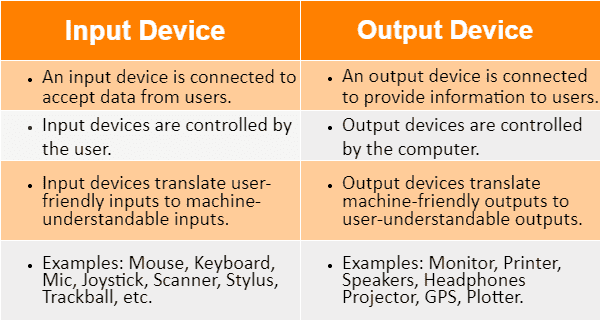
An input device is connected to the computer to feed data from the user to the computer. An output device is connected to a computer to provide data from the computer to the user.
The input device is controlled by the user. The output device is controlled by the computer (specifically the CPU).
Input devices translate user-friendly inputs into machine-understandable inputs. Output devices translate machine-friendly outputs into user-understandable outputs.
An input device helps to enter data or instructions to be processed by the computer. An output device generates results from the processed data to provide the desired result to the user.
The design or coding of input devices is more complex. This is because an input device ensures that the user can interact with the computer properly. The design or coding of output devices is less complex. This is because output devices only display results and do not require them to learn the procedures.
An input device is necessary for the computer to receive user commands or to receive data to be processed by the processor. An output device is necessary for a computer to share its results and to prompt users for more information or commands.
An input device can generally transmit data to other devices. However, it usually does not accept data from other devices. An output device can accept data from other devices and further process the data accordingly. However, it usually does not transmit data to other devices.
The most common examples of input devices are mouse, keyboard, microphone, trackball, trackpad/touchpad, joystick, scanner, etc. The most common examples of output devices are monitors, printers, plotters, projectors, speakers, headphones, etc.

What is the main difference between input and output devices?

The fundamental difference between input and output devices is that the input devices are connected to the computer to send user data to the computer, whereas the output devices receive the data coming from the computer and display it to the users in their understandable form. In short, the data sent by the input device to the computer for processing is reproduced or displayed by the output device.


Understanding Input and Output Devices with an Example

There are many examples of both input and output devices. However, we have discussed some of the most common ones.


Input Devices

Keyboard & Mouse: These are the primary input devices used to feed data to the computer. The keyboard consists of several keys that help to input alphabet letters, numbers, signs, and other information. The mouse works like a point-and-click device, which helps to move the cursor and select specific objects on the computer.


Mic: Mic, short for a microphone, is another common input device that accepts voice data. It typically receives voice input and converts analog sound waves into electrical signals, which are then digitized into a form that can be stored on a computer.


Webcam: Webcam is an input device that takes images/videos as input and converts them into digital form. Unlike digital cameras, webcams cannot operate on their own. They require a computer system to work and save the captured data. Modern computers and laptops come with webcams pre-installed.


Output Devices

Monitor: Monitor can be defined as the primary output device of a computer. Although it consists of many components, the screen is its main part. The monitor takes data from the computer and displays it on the screen in the form of pixels using the video card.


Printer: A printer is a common output device that helps in making prints (Xerox) of the data received from the computer. It takes electronic data from the computer and creates a hard copy of it on paper. Modern printers can print color text as well as graphics.


Speakers: Speakers help produce sound output. They receive signals from the computer's sound card and convert them into audio that the user can understand. Modern computers and laptops usually have inbuilt speakers.


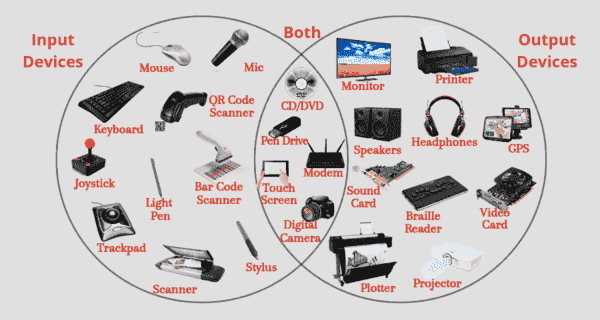
Note: It is important to note that some devices work as both input and output devices (input/output devices). They can accept input as well as produce the output. For example, touch screen, digital camera, pen drive, CD/DVD drive, modem, headset with mic, etc.


Difference between Input and Output Devices

The above image displays some input devices, some output devices, and some input-output devices.

Summary

The above article differentiates the input device from the output device. Generally, both the input and output devices are opposite to each other. An input device sends the information received by the users to the computer system for processing. On the other hand, an output device reproduces or displays the results of processing by the computer system to the users.


What others reading:
Read Article